
[VDI] MS Excel is slow on VDI
Issue Description
Customer feedback that using Microsoft Excel on VDI is very slow when operating excel files. The excel file contains over 3.5K worth of records.
Error/Warning Information

Performing sort,filter and save will load for few seconds and not responding temporarily.
Handling Process
-
The excel file is fairly small. Less than 5MB.
-
Inside the excel file has over 3K data’s on a single sheet and mostly using formulas and calculations.
-
User feedback that the same file is faster when operate on physical machine. The spec of VM and the physical machine are: VM: 4C8G , PC: 2C4G.
-
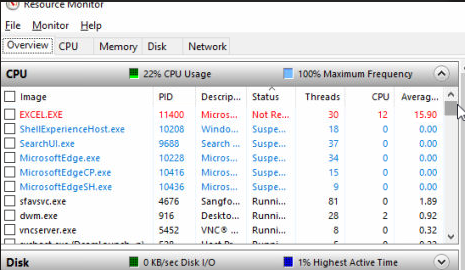
Open Resource Monitor on the VM, when operating on the Excel file the Excel process obviously consumed high CPU usage and causing the slowness and Not Responding.
-
Looked on forums online and determine that this is normal behaviour on Excel with large data and calculations.
Root Cause
Excel files contains a lot of data and uses formulas for calculation. When user performs sorting and filtering, Excel recalculate the data (which is redundant process since the data is not changed).
Solution
-
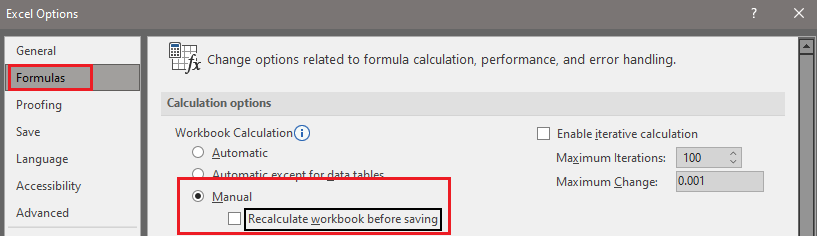
Go to Excel options > Formula > Calculation Options. Select ‘Manual’ and uncheck ‘Recalculate workbook before saving’.
-
Now operating the Excel file has no slowdown at all.
Note:
- Initially user argues that this method is not seems right and causes inconvenience. But as we compared on the physical machine, it uses the same configuration.
- Tested on physical machine to use ‘Automatic’ calculation option, there is obvious slowness and not responding.
Suggestions
- Remember to check the excel file size, content (whether involves alot of formula/calculations).
- Check turbostat on VMP host and ensure CPU is not underclocked.
- Compare with physical machine using same version of Excel.