
[VDI] Nodes Summary Showing 0%
Issue Description
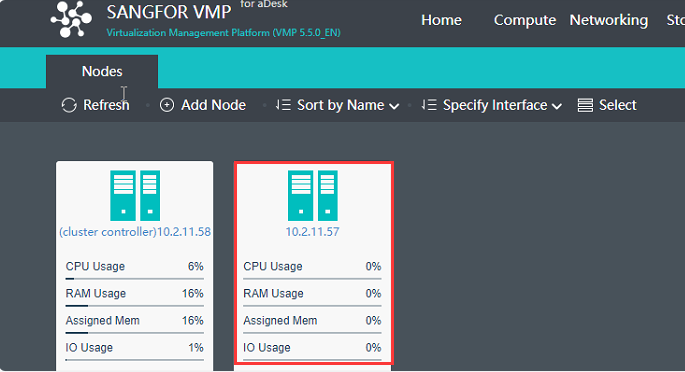
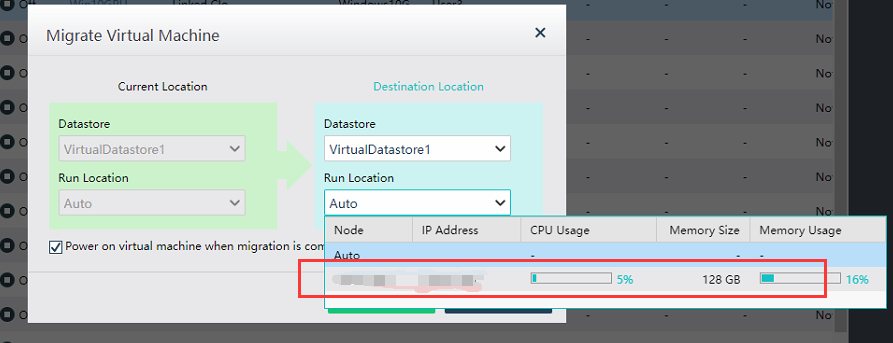
Nodes summary showing one of the node status is 0% and VM running node does not showing other available nodes.
Error/Warning Information
Handling Process
-
Perform packet capture and confirmed does not have STP packets.
-
Customer confirmed IGMP snooping and STP has already been disabled on physical switch.
-
View the management port used by the current host
cat /sf/cfg/if.d/clusterif.ini

-
View the virtual switch configuration of the host.
cat /cfs/nodes/$hostname/vsw.ini
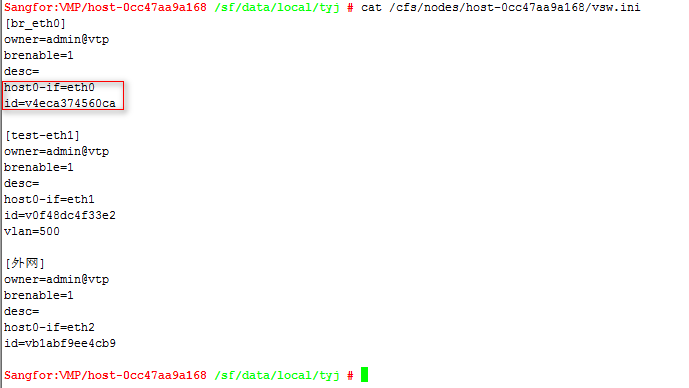
Find the id according to the management port. -
Check whether the IGMP snooping of the virtual switch is closed
cat /sys/class/net/v4eca374560ca/bridge/multicast_snooping

If it is 1, it means that the virtual switch is enabled with igmp snooping
The disable command is as follows:
echo 0> /sys/class/net/v4eca374560ca/bridge/multicast_snooping
Root Cause
The switch connected to the management port enables the multicast snooping IGMP snooping function, which suppresses the communication of multicast packets, causing the master to fail to receive multicast packets from the slave nodes
Solution
Disable the switch’s multicast snooping IGMP snooping. (Both virtual switch and physical switch)