
[VDI] Troubleshooting of Windows Abnormal Shutdown/Restart
Issue Description
There are multiple possible causes for Windows shutdown/restart abnormally.
For instances:
- The Windows crashed on a blue screen.
- A user or a program shutdown/restarted the computer.
- A power lost / Host power down.
Error/Warning Information
It is important to know which event IDs are related to system reboot/shutdown and how to locate the appropriate logs.
| Event ID | Descriptions |
|---|---|
| 41 | The system has rebooted without cleanly shutting down first. |
| 1074 | The system has been shutdown properly by a user or process. |
| 1076 | Aollows after Event ID 6008 and means that the first user with shutdown privileges logged on to the server after an unexpected restart or shutdown and specified the cause. |
| 6005 | The Event Log service was started. Indicates the system startup. |
| 6006 | The Event Log service was stopped. Indicates the proper system shutdown. |
| 6008 | The previous system shutdown was unexpected. |
| 6009 | The operating system version detected at the system startup. |
| 6013 | The system uptime in seconds. |
Handling Process
Display Shutdown Logs in Event Viewer.
The shutdown events with date and time can be shown using the Windows Event Viewer.
- Click Start > Run and type eventvwr and press enter to open Event Viewer.
- Expand Windows Logs on the left panel and go to System.
- Right-click on System and select Filter Current Log.
- Type the following IDs in the field and click OK:
41,1074,1076,6005,6006,6008,6009,6013

Find Shutdown Logs using PowerShell
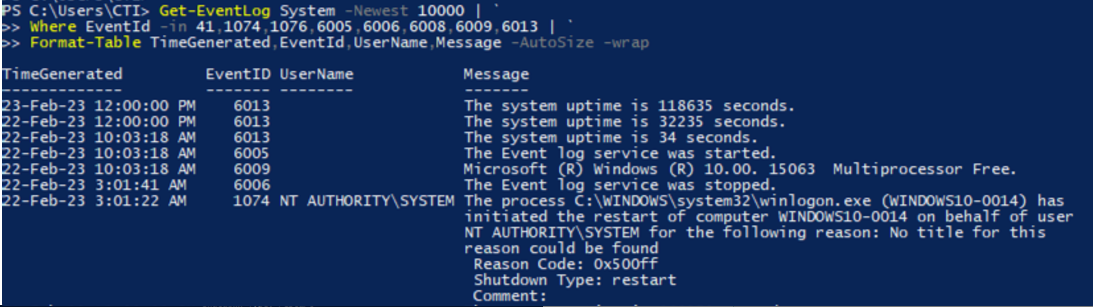
The shutdown/reboot logs in Windows can also be retrieved from the command-line using the PowerShell’s Get-EventLog command. For example, to filter the 10000 most recent entries in the System Event Log and display only events related to the Windows shutdowns:
PS C:> Get-EventLog System -Newest 10000 |
Where EventId -in 41,1074,1076,6005,6006,6008,6009,6013 |
Format-Table TimeGenerated,EventId,UserName,Message -AutoSize -wrap
Root Cause
Most of the time, it is caused by abnormal drivers or softwares. The above guide allows us to get some key informations on when and what initiates the shutdown.
Suggestions
Some other relevant guides:
- Use the System File Checker tool to repair missing or corrupted system files
- RuntimeBroker.exe