
[VDI] Upgrade Failed Due to Insufficient Space
Issue Description
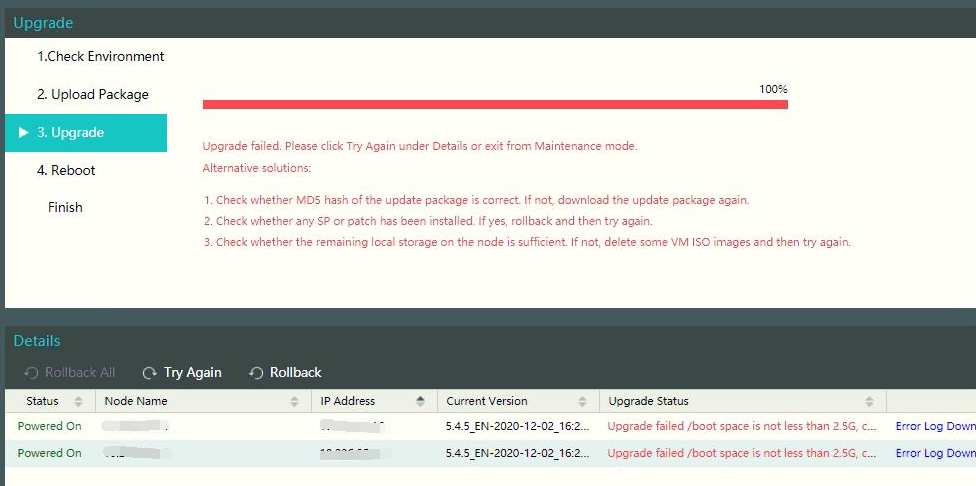
Upgrade failed because /boot partition does not have the required space.
Error/Warning Information
Handling Process
-
Check on available space in /boot partition, the available space is not met the requirement.
Command:df -h | grep boot |awk '{print $4}'

-
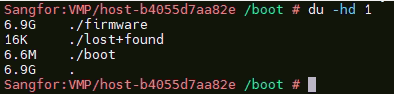
Check which file consuming large space on boot partition and found that firmware uses the most.
Command:ls -lh /boot
-
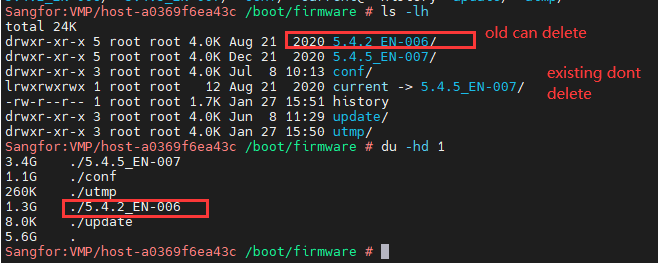
Check inside /boot/firmware for abnormality and found that files from previous version still remain.
-
Remove the 5.4.2_EN-006 folder to release 1GB space. Now, continue to upgrade the VMP.
Root Cause
Unused files consuming space.
Solution
Clear unused files on /boot/firmware partition.