
[VDI] USB removable devices appears under ‘Network Location’ on VDI Client.
Issue Description
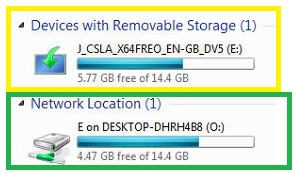
USB removable devices appears under ‘Network Location’ on VDI Client. Customer requires the USB devices to be detected as ‘Removable Storage’ instead of ‘Network Location’ in order to run certain programs.
Error/Warning Information
Handling Process
-
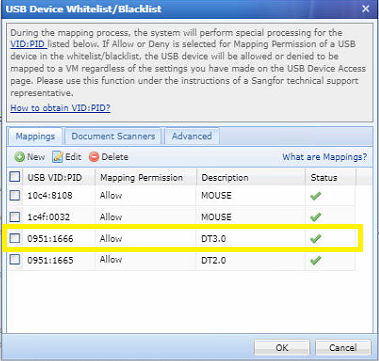
Upon testing multiple USB devices, one device always appear as ‘Removable Storage’, check on VDC and found that the USB device that always appears under ‘Removable Storage’ category is added into the usb whitelist.
-
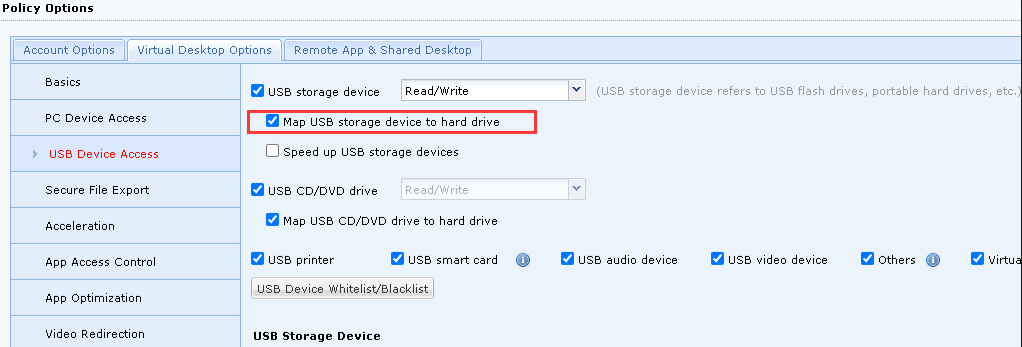
Continue checking on VDC policy, found that the following option is enabled.
-
By default, hard drives will be mapped under ‘Network Locations’ on VDI Client. Enabling "Map USB storage device to hard drive" will treat the USB devices as normal hard drives and mount under ‘Network Location’.
-
Uncheck this option to mount the USB devices as normal "Removable Storage".
Root Cause
By default, hard drives will be mapped under “Network Locations” on VDI Client. Enabling "Map USB storage device to hard drive" will treat the USB devices as normal hard drives and mount under “Network Location”.
Solution
Uncheck the “Map USB storage device to hard drive” option on VDC policy to mount the USB devices as normal “Removable Storage”.