
[VDI] VDC password recovery guide
Issue Description
Sometimes user might forget their VDC password and wish to recover their orignal password in order to login back to the account. This guide is used for internal staff to retrieve back the password for VDC.
Handling Process
-
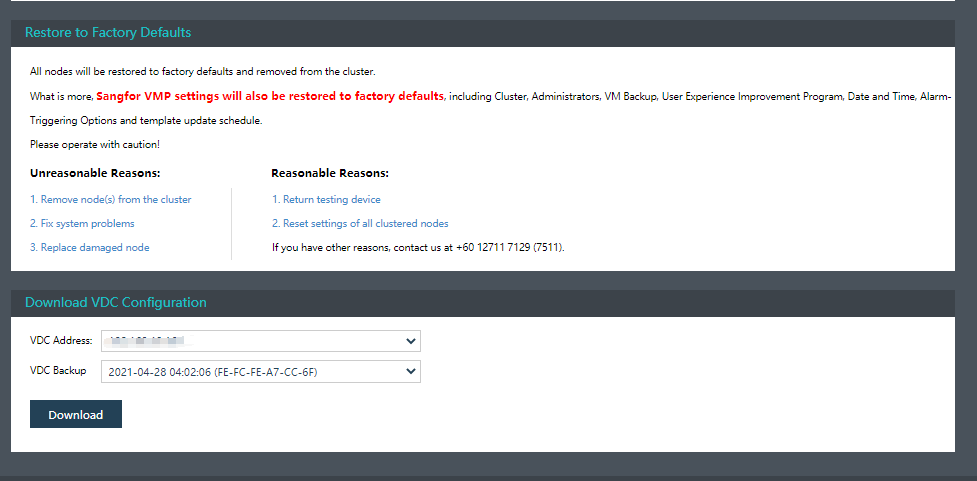
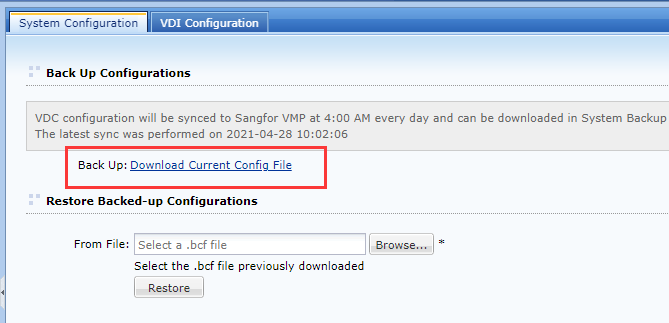
First, we will need to download the VDC configuration file. There are two ways to retrieve, first is download from VMP under System > System Backup and Restore, another way is to download from VDC through another VDC account (Under Maintainence > Backup & restore).
VMP
VDC
-
After downloaded the file, the file should be in .bcf format. We will need to change the format of file from .bcf format to .rar format. After this, extract the zipped file with password greatsinfor. After extracted it, the folder should consist of 2 files.

-
After this, change the format of cfgbk file from file to .rar format again. Repeat the same step, extract the cfgbk zipped file again.

-
If after extract the file still consist of cfgbk file. Repeat the same step, change the format of cfgbk file from file to .rar format and then extract it untill it consist of etc and sf folder consist in the folder.

-
Access the folder path sf\etc\sangfor to look for file ctrl_usr.sfr. After locate the file, use Notepad++ open the file.

-
From the file, you can get the encryted password of the admin account and other account. If want to decrypt the password, it will require to MOA contact 陈玉书58138 to decrypt the pasword.

Solution
Use VDC backup config to recover the password.
Suggestions
This method only applicable for VDI 5.4.0 above version.