
[VDI] VM Slow Boot
Issue Description
According to customer feedback, some virtual machines start slowly. It takes 5 minutes to enter the system, while normal virtual machines can enter the system within 20 seconds of starting.
Error/Warning Information
Handling Process
- The virtual storage space is sufficient, the fastIO option in virtual machine is selected and the agent status is normal.
- The cache disk ratio of the virtual storage is 2 SSD (447GB) and 6 HDD (3.64TB). When the virtual machine is powered on, the disk IO is not full.
- Check that the recently installed software and windows updates of the virtual machine are normal.
- Running -msconfig to shut down the virtual machine’s auto-startup program does not resolve the issue.
- Trying to enter the safe mode of the virtual machine results in the same slow boot.
- Try to replace the slow boot virtual machine registry with a normal boot registry and find that the boot time has become normal.
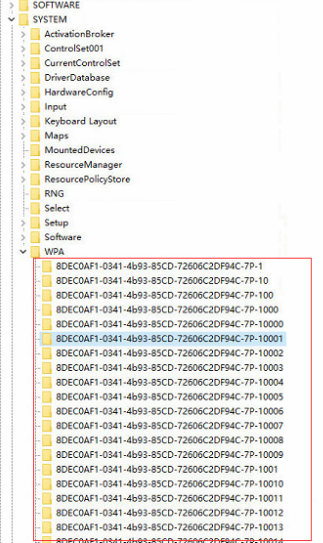
- Check the registry keys and find that there are high number of items under [HKEY_LOCAL_MACHINE\SYSTEM\WPA], with nearly 10,000 items.
Root Cause
This issue is related to the KMS activation tool or the Morto family virus.
Solution
Check the registry [HKEY_LOCAL_MACHINE\SYSTEM\WPA]. There are many items below, which leads to the long loading time of the virtual machine. Delete the WPA, and create a blank WPA item.