
[VDI] VMP could not detect hard disks in third party Huawei server
Issue Description
Third party server using Huawei Physical Server with RAID controller disk "SR150-M – SAS Avago 3408 IMR" could not detect hard disk inside VMP system.
Handling Process
-
Scan disks for few times and check from backend with ‘lsblk -d’ command also could not detect the disks.
-
Server Hardware management platform able to detect the hard disks.
-
Try with UEFI and Legacy mode to boot up VMP system also can’t detect the disks, RAID controller try cofigure with JBOD and RAID0 also can’t detect the disks.
-
Try install Red Hat Enterprise Linux in the server and it able to detect the disks in UEFI mode. (Note : VMP was based on Red hat Enterprise Linux 7.4 kernel)
-
Since the hard disks able to detect the disks with Red Hat Enterprise Linux, try change the RAID controller firmware driver to RHEL RAID driver from VMP backend.
Detail steps:
i. Use ‘modinfo megaraid_sas’ see the driver path.

ii. Access the driver path, backup the orginal driver file ‘megaraid_sas.ko’ to/home
iii. Replace new megaraid_sas.ko to that directory (Usually RAID Firmware driver will provide the .ko file)
iv. execute rmmod megaraid_sas
v. execute insmod megaraid_sas.ko -
However, after try replace with RHEL RAID firmware driver, VMP still unable to detect the hard disks.
-
Since VMP only can boot up successfully with Lecacy mode for the Huawei server, invite Huawei support to participate in the troubleshoot by having verification whether RHEL able to detect the hard disk in legacy mode.
-
Huawei support participate in the troubleshooting session, found out that the server BIOS need to disable Pxe configuration and console redirection only able to detect the disks.
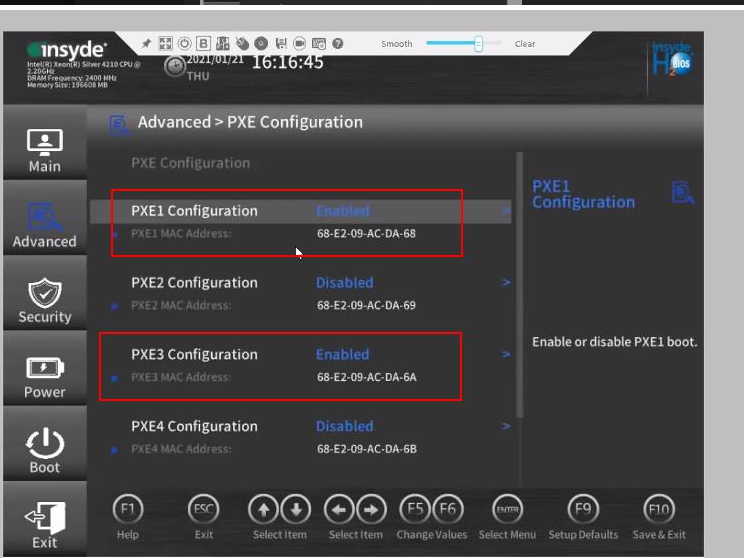
Root Cause
PXE Configuration and Console redirection need to be disabled in Server Bios. According to Huawei, Console redirection enables the system to map a specified physical or virtual serial port to the specified system serial port. While for PXE configuration, it is used to prevent NICs to boot from TFTP server for obtaining the boot image.
Solution
PXE Configuration and Console redirection need to be disabled in Server Bios.