
[VDI] VMP upgrade failed
Issue Description
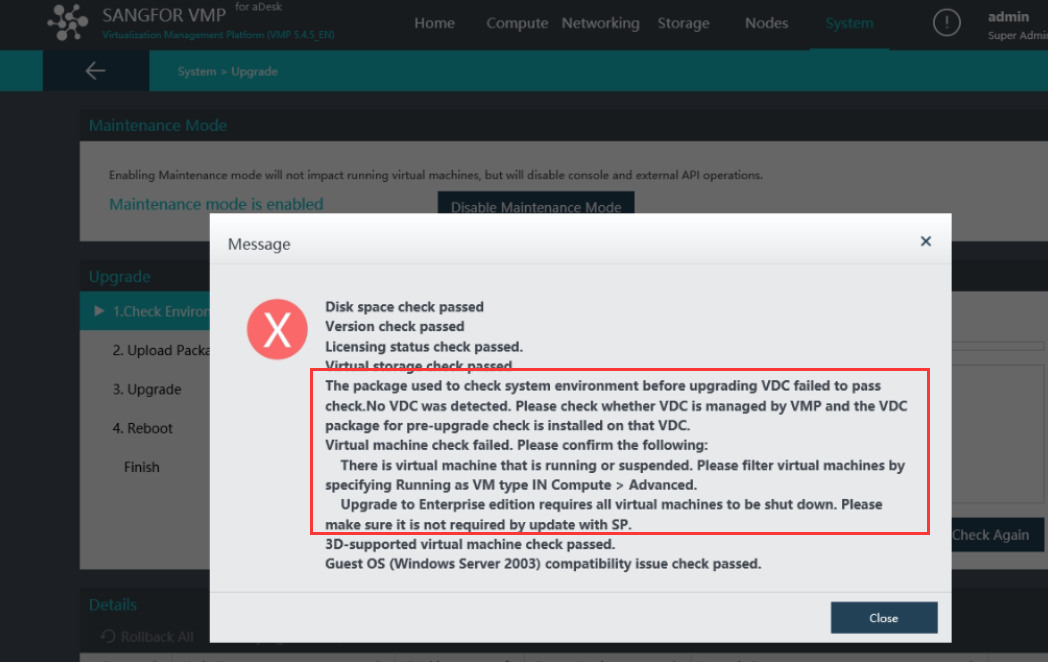
VMP upgrade failed, show error below:
Error/Warning Information
Handling Process
-
Try to run precheck in VDC
-
After installed precheck in VDC, found that the error still the same
-
Try shutdown VDC, after that found that still promt VDC check failed
-
Access VMP backend,
vim /usr/share/perl5/VTP/VAPI/Update.pmto comment the line check_vdc
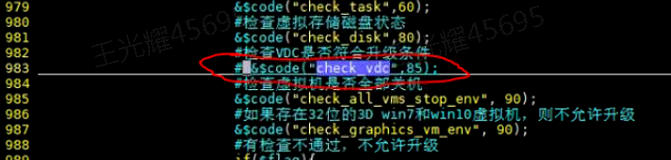
-
Run script check command
perl -c /usr/share/perl5/VTP/VAPI/Update.pm -
If the script check is normal, then proceed to restart services by using command
/sf/etc/init.d/vtpdaemon restart;/etc/init.d/apache2 restart
Root Cause
VDC check failed or VDC has been upgraded
Solution
Modify the detection script on the master node