
[VDI] When VDC RAM Exceed 8GB, There Is A Probability Of Process Stuck
Issue Description
After the configuration of the software VDC is modified to 8C16G, the configuration will take effect immediately and sometimes it will be stuck for a long time and eventually failed.
Handling Process
-
Execute cat /proc/sys/kernel/pid_max in VDC backend.
This value is the maximum process id of Linux, generally 32768. -
When the memory exceeds 8G, the VDC maximum process list will be modified to 100000.
-
Check the log of the scheduled service and find that an error log with a negative type is received.
Command: journalctl -u sangfor-schedule

-
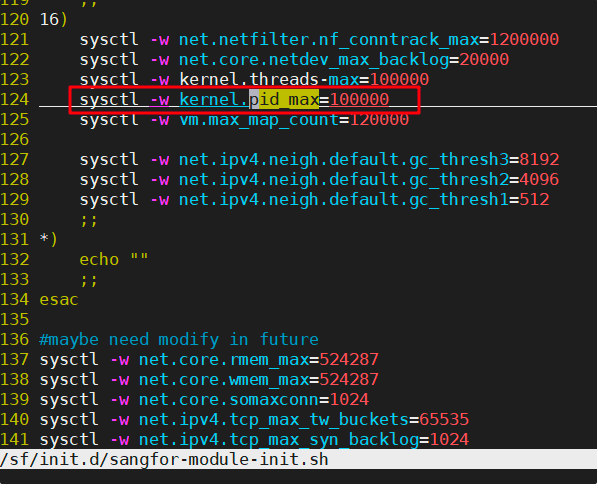
Check /sf/init.d/sangfor-module-init.sh, and search for pid_max. When the VDC memory exceeds 8G, the pid_max will be changed to 100000.
Root Cause
The schsnd_util uses the Linux messaging queue to send messages to the schedule for processing.
The message type is the pid of the schsnd_util process.
If the pid exceeds 32768, it will cause an integer overflow leading to a negative number, causing the message to fail to be sent.
Solution
Delete the line that modifies pid_max in the /sf/init.d/sangfor-module-init.sh script file, and then restart the VDC. (Refer Step 4.)