
[vdi] WPS LDP causes VM with a black screen on the login Reset
Problem Description
Client operating system: Windows 7
Problem phenomenon: Auto unlock after than 10 secs on the Windows Log In interface, the screen will go black and Reset
Effective troubleshooting steps
- Close FastIO for VM
- Prepare the DISM++ tool
- Passed PE (Micro PE is recommended, which has builtChangePredefined DISM++, Password modification, DG Disk Wizard etc., useful desktop operation Desktop maintenance tools)
- Open Dism++, Select the original system disk (the original system disk may not be the C drive), and select Startup entries updated administration and management-Service entries updated
Find ldpkit, LDP Service for kingsoft wps. Disable Disabled
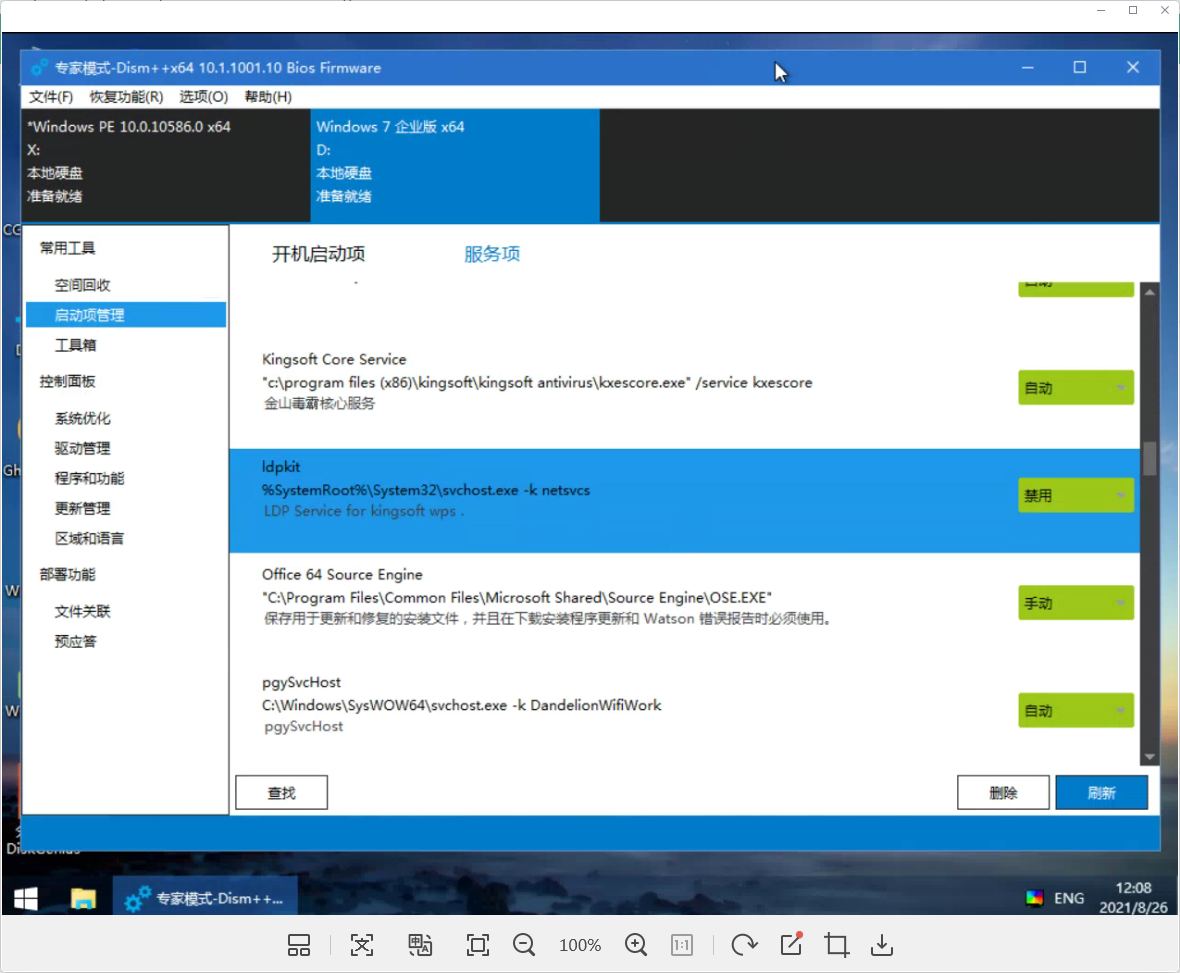
- After Delete PE, boot Connected and wait for about 30 secs at the Log In interface to see if the black screen will Reset
Root cause
The WPS ldpkit Service causes a black screen Auto unlock after the login interface
solution
Reference troubleshooting steps
Original Link
https://support.sangfor.com.cn/cases/list?product_id=26&type=1&category_id=11442&isOpen=true