
[VDI] VDC create new resource indicate that the storage is offline or insufficient
Issue Description
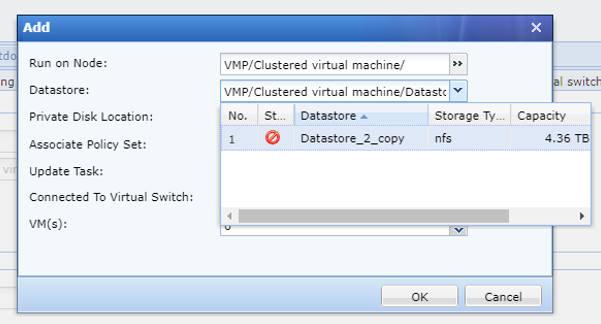
While deriving resources from the VDC, selecting a storage location prompts an error indicating that the storage is either offline or insufficient. Although the available space is 445GB, the storage utilization is 91%. When acquiring resources, VDC specifically marks storage B as offline or insufficient.
Error/Warning Information
Handling Process
- Check the storage status on the VMP. Both local storages appear normal.
- Deploying a virtual machine from the VMP is possible, but an alarm is triggered, as shown in the attached figure.

Root Cause
When the VMP creates a virtual machine and selects the storage location, it calls the storagetree interface.
- A returned status of 1 indicates normal operation.
- A status of 5 indicates that storage utilization exceeds 90%.
In this case, the VMP displays a prompt message but still allows virtual machine creation. However, the VDC detects that storage usage exceeds 90% and prevents the deployment of virtual machines.
Solution
- Go to VMP backend,
vim /usr/share/perl5/VTP/VAPI/Storage/Vtpconfig.pm
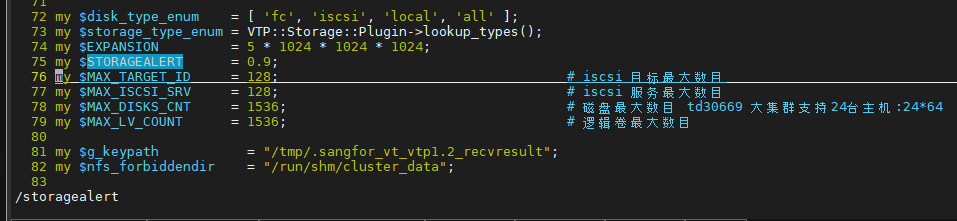
- Modify the value of STORAGEALERT from 0.9 to a higher ratio, for example to 0.92.
Suggestions
This modification is applied under special circumstances. Typically, when storage usage reaches 90%, the recommended solution is to advise the customer to expand the storage capacity.