
[VDI]Windows VDI Client Radius Authentication not successful
Issue Description
Windows VDI client ask for the token after successful login with username and password, but after try to insert the password, it receives the error state that the authentication ID is not correct. Radius server is using FortiClient Authenticator with the integration of LDAP server.
Error/Warning Information
FortiClient log showing the password is incorrect, but user feedback the password and the token is correct.

Handling Process
-
Try packet capture in VDC back end, found that the RADIUS request has been send by VDC by reject by RADIUS server.

-
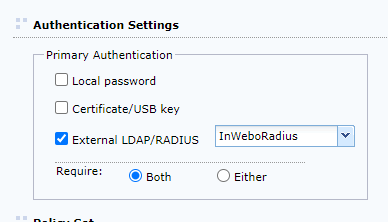
Check VDC user configuration, the user authentication was pointed to the RADIUS server
-
Check the RADIUS configuration, the configuration was correct.
-
At below session, try change the mapping rules to one of the LDAP group, after this VDI Client able to login successfully.

-
Packet capture at VDC back end, the RADIUS authentication also successful.

Root Cause
Radius user need to map to a specific LDAP group for authentication.
Solution
In Radius settings, map to a specific LDAP group for authentication.