
[aDesk] Macbook/iPhone client did not have sound output when connect to VDI VM.
Issue Description
Macbook/iPhone client did not have sound output when connect to VDI VM.
Effective troubleshooting steps
- Check whether the issue persist on Andriod/PC user.
- Found the issue only happen on Apple device user.
Solution
- On the Macbook/iPhone, login the VDI client.
- After login, navigate to Settings > Remote App Options > enable the option "Remote voice to local".
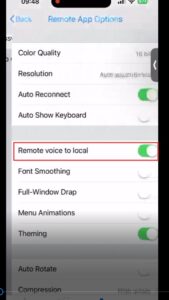
- Relogin to the VDI client, the issue will then be resolved.
Note:
- Once the changes have been applied, the user must re-login to the VDI client to ensure the changes take effect.