
[VDI]Thin Client and VDI Client Unable To Access VM
Issue Description
In this new deployment scenario, user found that thin client and VDI client both are unable to connect to the VM.
-
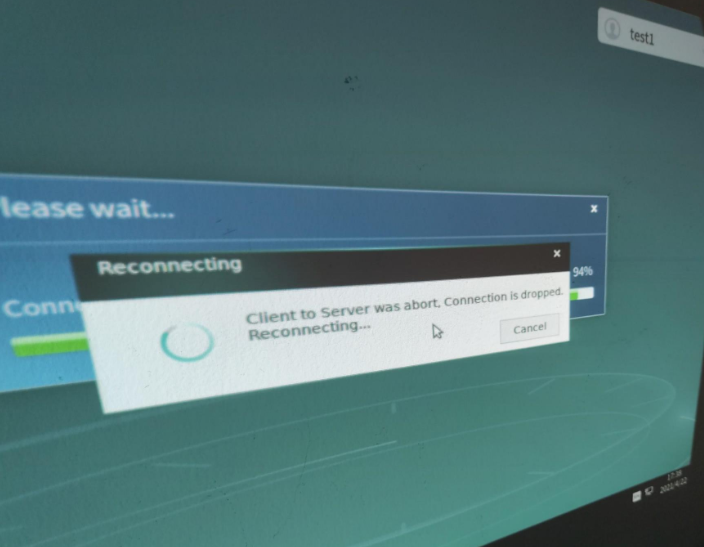
For thin client access, it will stuck at reconnecting status for more than 1 hour.
-
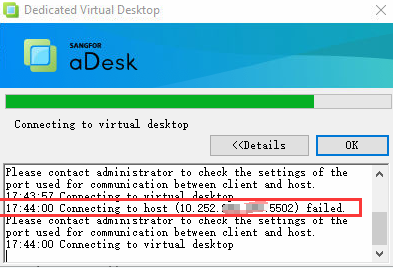
For VDI client, it will show "Connecting to host (10.xxx.xxx.xxx:5520) failed. Please contact administrator to check the settings of the port used for communication between client and host."
Error/Warning Information
Thin Client Error:
VDI Client Error:
Handling Process
-
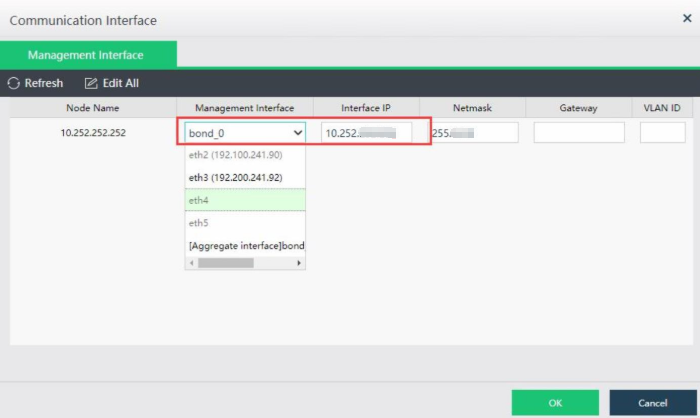
Check the VMP communication interface is using ETH 0 (10.252.xxx.xxx).
-
Go to VDC platform, check VDI Options > VMP and found the VMP ip address is 192.168.xxx.xxx IP. This 192.168.xxx.xxx is the IP address of VMP node’s ETH3.

-
VDC need to communicate with VMP on management interface in order to access virtual machine normally.
Next, try to modify the VMP management interface IP address on VDC which is 10.252.xxx.xxx segment.
Root Cause
VDC communicate with VMP not using communication interface but a ETH 3 network card.
Solution
Modify the VMP IP address on VDC and make sure VDC can communicate with VMP management interface not other interface.