
[VDI]VDC Import LDAP User Reached Max Support Limitation
Issue Description
Customer trying to import 40K LDAP domain user into VDC, but only 15K user is able to import successfully.
Error/Warning Information
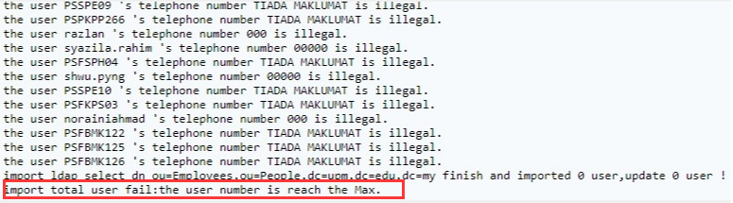
Handling Process
-
Check the AD group user, found the total user is reached 15K. By default, VDC only supports 15K local user, to having more than 15K user, we need to modify the limitation via VDC backend.
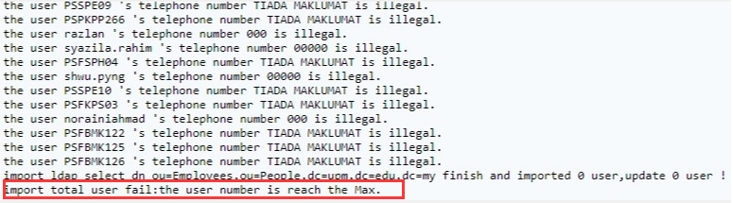
-
Confirm the total LDAP user that the customer going to import into VDC, for example: 40K. To support this, we need to increase the memory of the VDC, else the VDC will always in high memory usage.
Refer to :Modify VDC 2GB Memory to Higher
-
Next, modify the total user limiation via VDC backend. There are total 1 or 2 file is required to modify depends on version.
Try to use the command to find the file call "MaxRecord.ini" in VDC.
Command:find / -name MaxRecord.iniBefore 5.4.0 (Modified 1 file):
Command:vi /etc/sinfor/ssl/MaxRecord.iniAfter 5.4.5 (Modified 2 file):
i. Command:vi /sf/etc/sinfor/ssl/MaxRecord.ini
ii. Command:vi /sf/mfs/etc/sangfor/ssl/MaxRecord.iniBefore:
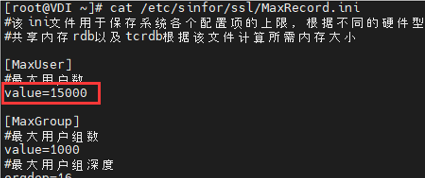
After:
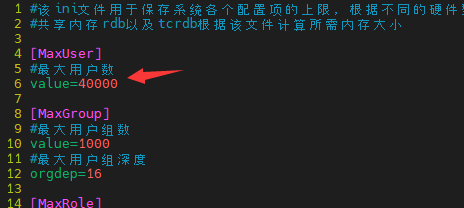
-
This steps is most important, after modify the step3, you must restart all the services using root account
Command:restartall -
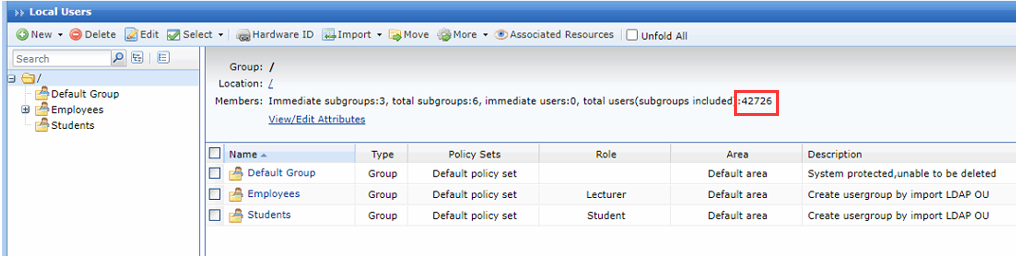
Try to reimport the LDAP user, now VDC able to import more than 40K user depends on the need.
Root Cause
VDC only support 15K local user by default.
Solution
Backend modify the 15K total user limitation.
Suggestions
NOTE: For the version before 5.4.0, after modifying this will cause VDC upgrade fail in future. Remind customer to contact us before perform an upgrade activity.