
【WANO】Access Abnormal: Local Subnet Is Not Added
Issue Description
Sangfor VPN has been successfully established but can only access the LAN port network segment of the peer end. Other network segments on the intranet cannot be accessed. (This case screenshot is from the internal experimental environment)
For example, we have the following case:
Both devices are deploy in Bridge mode. The HQ has only one network segment of 192.168.20.0/24 (lane with the same network segment). The Branch has two network segments 192.168.30.0/24 (lan network segment), 172.168.30.0/24. As shown in the figure below, our VPN has been successfully established and can ping the lan port of the Branch but the other segments cannot be pinged.
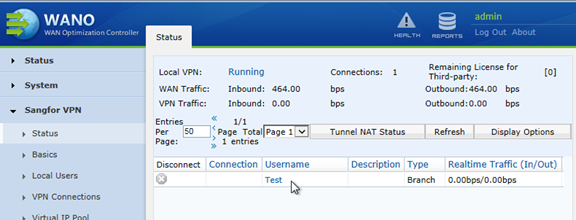
HQ VPN status:
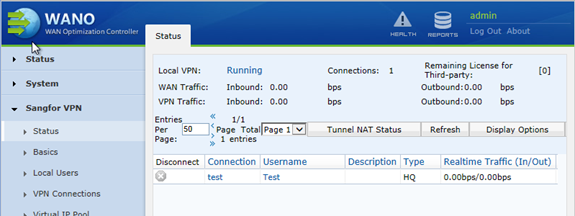
Brach VPN status:
Ping the LAN port of the the branch device on HQ device:

On the HQ device, ping the 172.168.30.0/24 network segments of the Branch is unreachable:

Handling Process
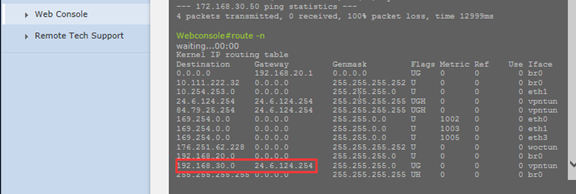
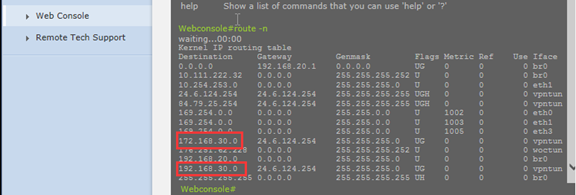
On the HQ page console, we can see that the route can only see the route of the LAN network segment of the Branch. The routes of the 172.168.30.0/24 network segments are not seen.
At this point, we need to add the local subnet (non-LAN network segment) to the Branch device. ps: The local subnet is the intranet segment of the local device. As shown in the following figure, we add the intranet segments to the local subnet.
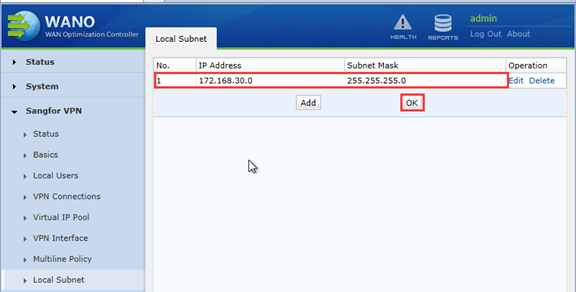
After adding the local subnet at the Branch, the HQ ping test found that 172.168.30.0/24 are normal at this time.

You can also see that there are one more routes in the device routing table.
Root Cause
The local subnet was not added in the Branch device.
Solution
Add a local subnet in the Branch device.
Suggestion
When it is a multi-network segment, you need to add a local subnet. The purpose of adding a local subnet is to advertise the local subnet segment to the peer. Only the peer device can learn the route of the local network segment to ensure smooth data flow.