
【WANO】Acceleration Fail : Import Certificate
Issue Description
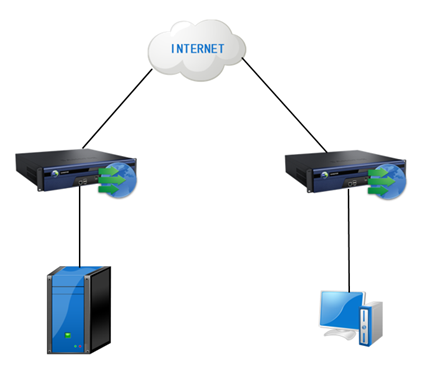
Unable to accelerate when the PC access to the server(Mail or any SSL based server). That is because the Mail or SSL based server are encrypted server so need to import certificate in to the server side WANO(WANO that is in the server side) to perform acceleration.
Error/Warning Information
Handling Process
Below are the step to import the certificate into the WANO:
1.Click [New] to add new Server Certificate.
Path: WAN Optimization > Certificates > Server Certificate
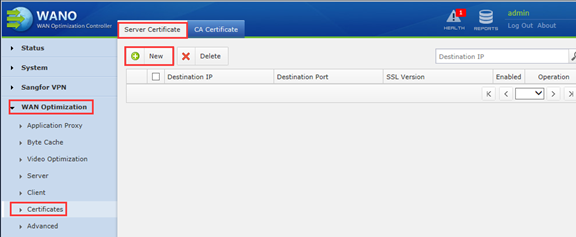
2.Fill up the related information.
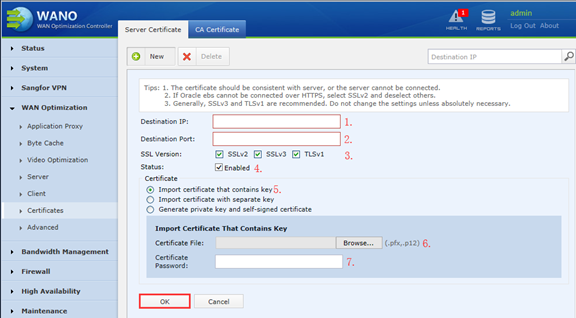
3.Destination IP is the Server IP address.
4.Destination Port recommend to use “0”(zero, equivalent to All Port) if did not have specific requirement.
- SSL version keep it as default setting if did not have specific requirement.
- Enable the Server Certificate.
5.Recommend to use “Import certificate that contains key”.
7.To import the Server Certificate (only support .pfx and p12 format).
8.Private key of the certificate.
9.click [ok].
Root Cause
The server side WANO unable to accelerate encrypted traffic.
Decryption requires to import the Server Certificate.
Solution
Import server certification to server side WANO