
【WANO】Bandwidth Control Fail
Issue Description
The WANO deploy as gateway mode. The WAN port has bandwidth of 500 Mbps. The bandwidth control policy for configuring the Internet is limited to 40 Mbps. However, when uses the speed test tool to test the internet speed still 500 Mbps.
Handling Process
- Check the bandwidth control policy configuration of the WANO. There is no problem with the configuration.
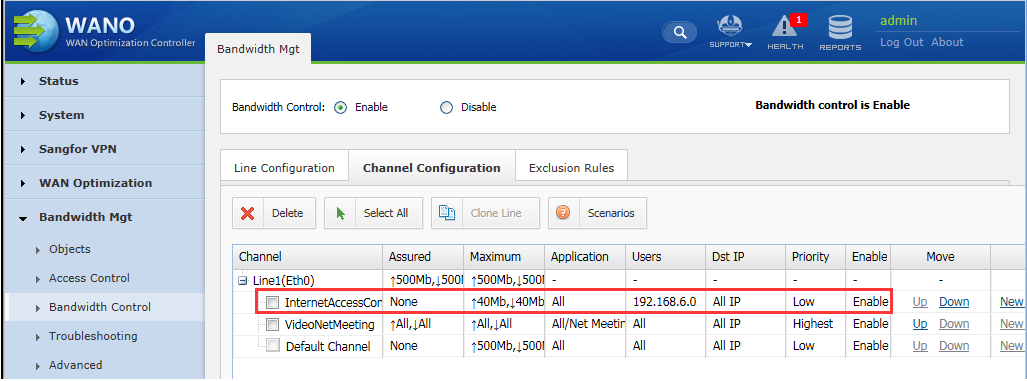
Path: Bandwidth Mgt > Bandwidth Control > Channel Configuration
2.Check and confirm that the traffic have pass through our WANO
3.Found out that the Users IP have inside the Excluded IP.
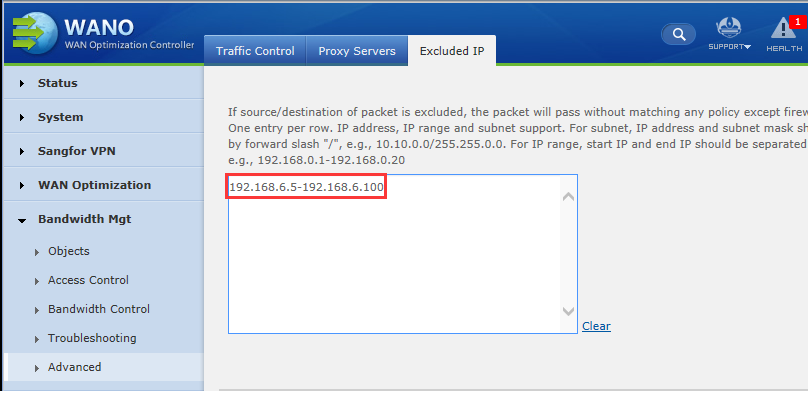
4.After delete the IP from excluded IP then the Bandwidth control is workingRoot Cause
Because the user IP is inside the Excluded IP, So the Bandwidth Management will not affect the IP which is inside the Excluded IP range
Solution
Delete it from Excluded IP then the Bandwidth Management policy can success match the user.