
【WANO】Internet Access Slow: Bandwidth Control Configuration Error
Issue Description
Experience slow in accessing the Internet and slow to open web pages. (This case screenshot comes from the internal experimental environment)
Handling Process
- Connect the internal network computer directly to the eth0 port of WANO, and test the Internet speed is still slow.
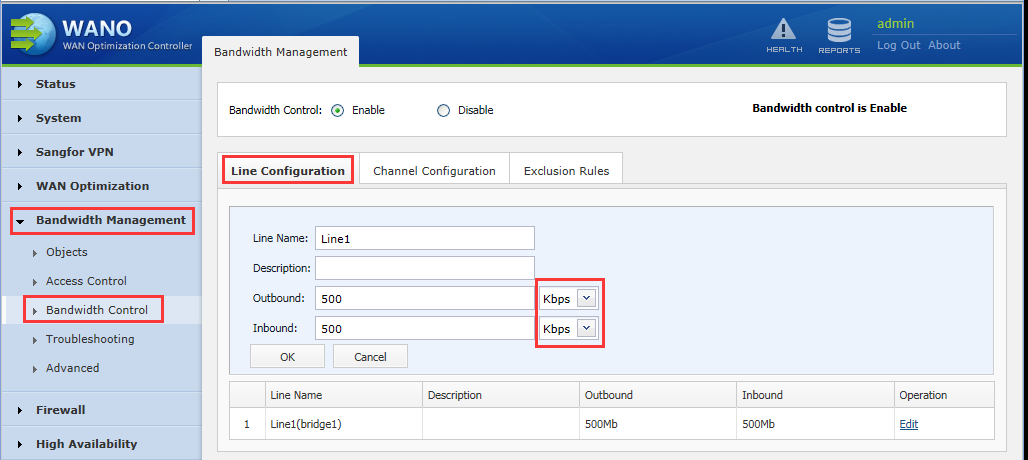
- Enter the WANO Web UI and check the [Bandwidth Management] is enabled, and the line bandwidth is only 500Kbps, as shown in Figure:
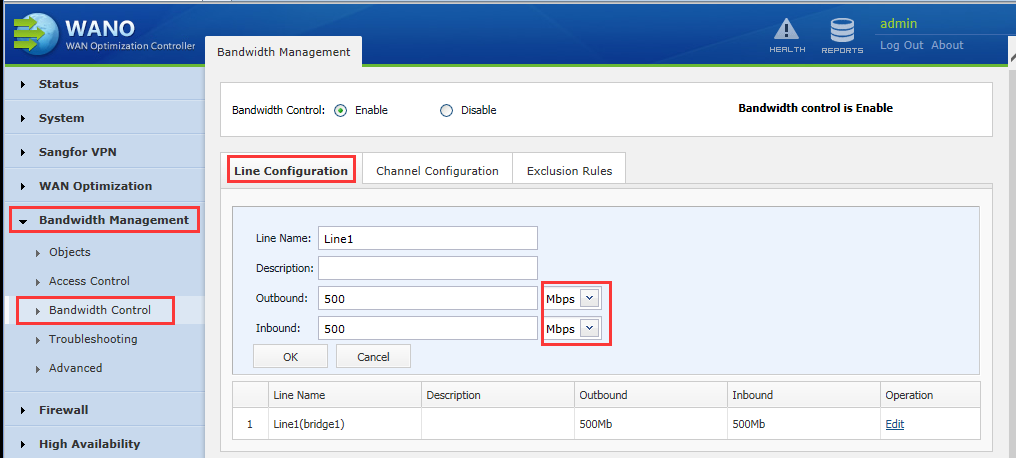
Path: Bandwidth Management > Bandwidth Control >Line Configuration
- After modifying the line bandwidth to 500Mbps, the Internet speed is normal, as shown in the figure:
Root Cause
The error in the bandwidth control configuration of the external network line leads to slow Internet access.
Solution
Modify the line bandwidth in [Bandwidth Management] , or do not enable the bandwidth control.
*It is highly recommended to use exact Total Bandwidth in the Line Configuration settings