
【WANO】Unable To Access Web Console: Did Not Enable MAC Track And Static Route Is Not Configured
Issue Description
The WANO is deployed in Bridge-mode. PC is in the direction of LAN interface through a router (the network segment is not on the same network segment as the Sangfor WANO). IP address of the bridge port of the WANO device is not Ping-able as well as the Web Console is unable to access from the PC.
Handling Process
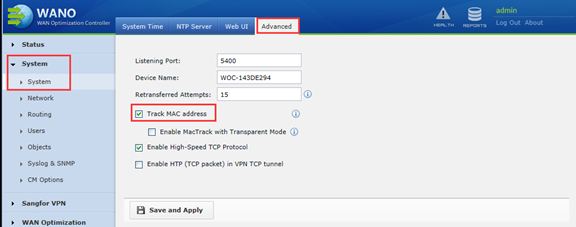
- Check “Track MAC address” to ensure that the internal network routing is reachable.
Path: System > System > Advanced
- Static routes can also be configured to ensure that internal routes are reachable if do not want to enable “Track MAC address”.
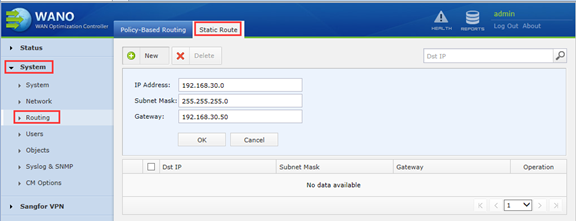
IP address: Local Subnet
Gateway:IP address of the device interface connected to the internal network port of the WANO
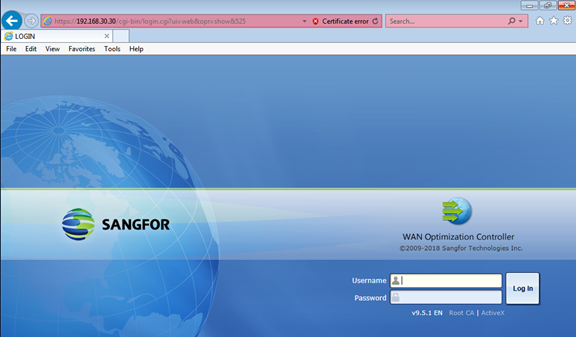
3.After that the Web console can access normally.
Root Cause
The LAN segment pass through layer-3 device and the route is unreachable. As a result, the ping fails and the console cannot be accessed due to WANO does not have route which route to the internal network segment.
The WAN port can be accessed because of the default route will route to WAN direction..
Solution
Manually create a route policy to internal network segment in WANO.