
【WANO】VPN Communication Failure: Unable To Obtain Internet IP
Issue Description
Sangfor VPN established but unable to access to local subnet
Handling Process
- Confirmed that the IP is in the local subnet
- Confirmed that the routing has no issue
- Check on VPN status, saw that there is no Internet IP
Root Cause
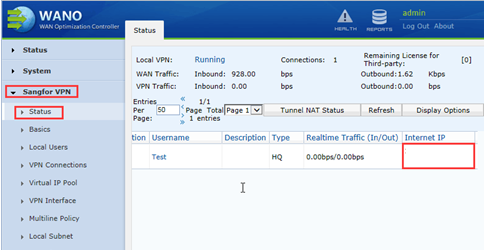
When Internet IP is not obtained, fake connection is established. This fake connection is unable to allow access to local subnet.
This type of issue is normally seen when using UDP transmission protocol to build VPN. When using this type of transmission protocol to build VPN, TCP protocol will be used for the three-way handshake, after successfully performed the three-way handshake, UDP protocol will be used for communication.
If there are issue with the traffic for example packet drop or traffic blocked, the issue of unable to obtain Internet IP will occur.
Solution
- Ensure HQ has stable UDP port connection and UDP port forward
- Or modify the transmission protocol of the VPN connection in branch device TCP