
【WANO】WANO Sangfor VPN Unable To Connect, VPN Interface IP Conflict
Issue Description
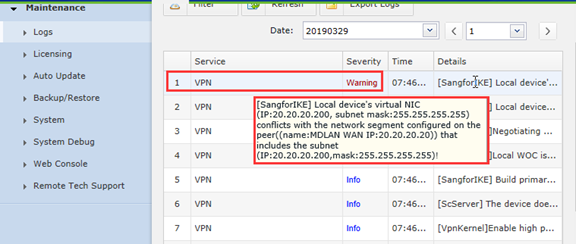
The HQ and the branch establish SANGFOR VPN, and the VPN can’t connect. The log prompts: [SangforIKE] Local device’s virtual NIC (IP: 20.20.20.200, subnet mask: 255.255.255.255) conflict with the network segment configured on the peer ((name:MDLAN WAN IP : 20.20.20.20)) that includes the subnet!.See the screenshot below for the detail: (The screenshot of this case comes from the internal experimental environment).
Handling Process
- Check the HQ site interface and VPN interface configuration.
- Check the Branch site interface and VPN interface configuration.
Root Cause
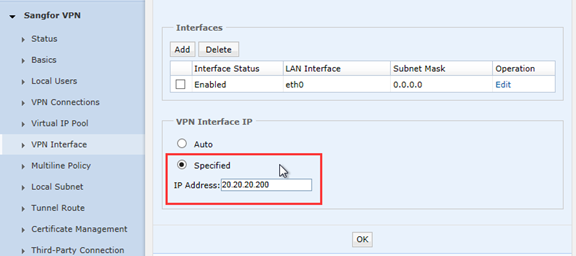
The IP address of the VPN interface of the branch device conflicts with the IP network segment of the WAN port of the HQ device, causing the SANGFOR VPN to fail to connect.
Solution
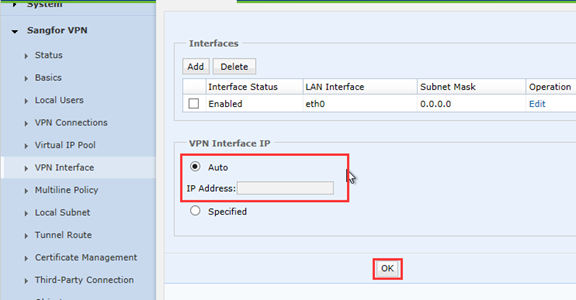
Change the IP address of the VPN interface of the branch device to the Auto (Note: Clicking ok will restart the VPN service)
Suggestion
Ensure the address of the two ends does not conflict. VPN interface is the virtual routing interface for the VPN data. It is used to forward data to the VPN tunnel and encapsulate packets.